Form 26QB: How to Fill and File TDS on Property Purchase
What Is Form 26QB?
Form 26QB is the TDS challan-cum-statement that a buyer must file when purchasing an immovable property (land, flat, house, or commercial property) for Rs. 50 lakh or more. It is filed online on the Income Tax e-filing portal and serves two purposes at once: it declares the TDS deduction and authorises the payment to the government.
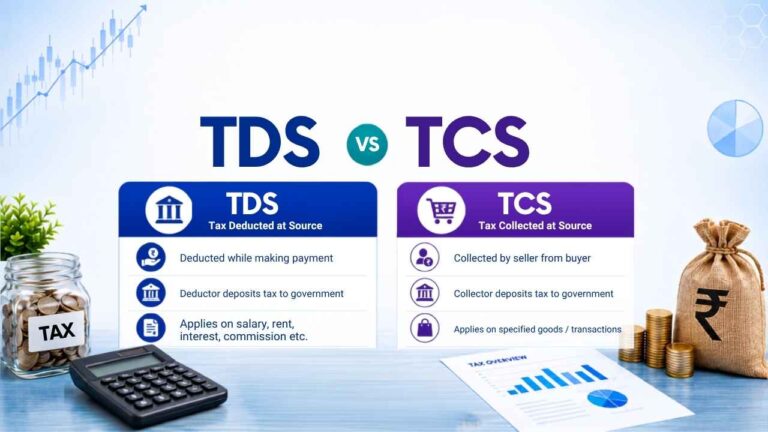
The legal basis is Section 194IA of the Income Tax Act. Under this section, every buyer is legally responsible for deducting TDS at 1% of the total sale consideration at the time of payment to the seller. This applies even if the buyer is a salaried employee with no other business income.
If you are buying a property for Rs. 75 lakh, you deduct Rs. 75,000 (1%) from the seller’s payment, pay it to the government using Form 26QB, and then transfer the remaining Rs. 74,25,000 to the seller.
The seller then claims this Rs. 75,000 as a TDS credit against their tax liability when filing their ITR.
When Does Form 26QB Apply?
Form 26QB applies when all of the following conditions are met:
Property type: Immovable property: residential flat, house, plot of land, or commercial property. Agricultural land is excluded.
Sale consideration: Rs. 50 lakh or more. If the total agreed price is Rs. 49 lakh, no TDS applies. If it is Rs. 50 lakh or more, TDS applies on the entire amount and not just the amount above Rs. 50 lakh.
Buyer: Any individual, HUF, or entity buying the property. You do not need to be a business owner or have a TAN (Tax Deduction Account Number). Your PAN is sufficient.
Seller: A resident Indian. If the seller is an NRI, different TDS rules apply under Section 195, and a TAN is required. Form 26QB is only for resident sellers.
Important: If there are multiple buyers or multiple sellers, each buyer-seller combination requires a separate Form 26QB. For example, if two buyers are purchasing a property from one seller, two Form 26QB filings are required, one for each buyer’s share.
TDS Rate Under Form 26QB
Standard rate: 1% of the higher of the sale consideration or the stamp duty value (circle rate or government-assessed value) of the property. This amendment came into effect via Finance Act 2024. If the stamp duty value of your property is Rs. 65 lakh but the agreed sale price is Rs. 60 lakh, TDS is calculated on Rs. 65 lakh, not Rs. 60 lakh.
Higher rate (20%) applies if:
Seller does not have a PAN: If the seller cannot provide a valid PAN, TDS must be deducted at 20%.
Seller’s PAN is inoperative: From May 2024, if the seller’s PAN is not linked to Aadhaar and therefore inoperative, TDS applies at 20%. Always verify the seller’s PAN status on the income tax portal before the transaction closes. For a full overview of income tax rules, see our complete income tax guide.
Step-by-Step: How to File Form 26QB Online
You do not need a CA or tax professional to file Form 26QB. The entire process is online and takes about 20 minutes if you have all the details ready.
What You Need Before You Start
Your PAN (buyer’s PAN)
Seller’s PAN: get this from the seller before the payment date
Property details: complete address, survey number or flat number, and the state
Sale consideration amount (the agreed total price)
Date of agreement and date of payment (or date of each instalment if paying in parts)
Bank account with net banking for online payment
Step 1: Log In to the Income Tax Portal
Go to incometax.gov.in and log in using your PAN and password. This is the same portal you use for ITR filing. After logging in, go to e-File, then select e-Pay Tax, and click on New Payment. Select TDS on Sale of Property (Form 26QB). Your personal details will be auto-filled from your registered profile.
Step 2: Fill in the Buyer’s Details
Enter your PAN, full name as per PAN card, your complete address including PIN code, email ID, and mobile number. The mobile number and email will be used to send the payment confirmation.
Step 3: Fill in the Seller’s Details
Enter the seller’s PAN and full name as per PAN. If there are multiple sellers (e.g., joint ownership), you will need to file separate Form 26QB for each seller’s share.
Step 4: Enter Property Details
Select the property type (land, building, or both). Enter the complete address of the property being purchased, including PIN code and state. Enter the total sale consideration amount (the full agreed price, not the amount you are paying in this instalment) and the stamp duty value of the property. The portal uses the higher of these two figures as the base for TDS calculation.
Step 5: Enter Payment Details
Total sale consideration: Full agreed price (e.g., Rs. 75,00,000)
Amount paid/credited in the current transaction: The amount being paid now
Date of agreement/booking
Date of payment (the date you are making this payment to the seller)
TDS amount: 1% of the amount being paid now (the portal calculates this automatically)
Note on instalment payments: If you are paying in instalments (e.g., under construction property), you must file a separate Form 26QB for each instalment at the time of each payment. TDS of 1% applies to each instalment separately.
Step 6: Submit and Make Payment
Click Proceed. The portal will show a summary. Verify all details, especially the PAN of both parties. Once you click Confirm, you cannot edit the form.
After confirmation, you will be redirected to the bank’s net banking page for payment. Pay the TDS amount. After successful payment, you will receive a challan receipt with a unique acknowledgement number (BSR code and challan serial number). Save this receipt, as you will need it later.
Step 7: Download Form 16B
After filing Form 26QB and making the payment, you must give the seller a Form 16B, which is the TDS certificate for the buyer. You are legally required to issue Form 16B to the seller within 15 days from the due date of Form 26QB filing. It is generated on the TRACES portal (tdscpc.gov.in) once the payment is processed and reflected.
To download Form 16B:
1. Log in to tdscpc.gov.in using your PAN
2. Go to Downloads > Form 16B (For Buyer)
3. Enter acknowledgement number from Form 26QB, financial year, and seller’s PAN
4. Download the Form 16B and share it with the seller
The seller needs Form 16B to claim TDS credit in their ITR. Giving Form 16B to the seller is your legal obligation.
Deadline for Filing Form 26QB
Form 26QB must be filed and TDS must be paid within 30 days from the end of the month in which the payment was made to the seller.
| Payment made to seller in | Form 26QB deadline |
|---|---|
| April 2025 | 30 May 2025 |
| October 2025 | 30 November 2025 |
| March 2026 | 30 April 2026 |
If you are paying in instalments, the 30-day clock restarts with each instalment. Each payment triggers a fresh Form 26QB filing obligation with its own 30-day deadline.
Penalty for Late Filing of Form 26QB
Missing the 30-day deadline has serious financial consequences for the buyer. Here is what happens:
Interest under Section 201(1A): If TDS was deducted but not deposited on time, interest is charged at 1.5% per month (or part of a month) from the date of deduction to the date of actual payment. This is on top of the TDS amount itself.
Interest under Section 201(1A) for non-deduction: If TDS was not deducted at all, interest is charged at 1% per month from the date TDS was due to the date of deduction.
Late filing fee under Section 234E: Rs. 200 per day for every day the filing is delayed, from the due date to the actual date of filing. The exact penalty amount is capped at the total TDS due. This fee cannot exceed the total TDS amount.
Penalty under Section 271H: The Assessing Officer can impose a penalty of Rs. 10,000 to Rs. 1,00,000 for failure to file Form 26QB or for filing incorrect information. This is separate from the interest and late filing fee.
Disallowance of property expense: If the buyer fails to deduct TDS, 30% of the payment made to the seller can be disallowed as a tax deduction in the buyer’s hands (if the buyer is using the property for business purposes).
Real cost of delay: If you paid Rs. 75 lakh in April and forgot to file Form 26QB until September 30 (5 months late), the interest alone would be Rs. 5,625 (Rs. 75,000 TDS x 1.5% x 5 months), plus Rs. 24,600 in late filing fees (123 days from May 30 deadline to September 30 x Rs. 200/day). Total extra cost: approximately Rs. 30,225 for a 5-month delay.
How the Seller Claims TDS Credit
After you file Form 26QB and the payment is processed, the TDS amount appears in the seller’s Form 26AS under Part F (TDS on Sale of Immovable Property by Taxpayer, as Buyer). It also appears in the seller’s AIS (Annual Information Statement).
The seller claims this TDS credit while filing their ITR. The credit reduces the seller’s total tax liability for the year. If the seller’s total tax liability is less than the TDS deducted, the excess becomes a refund.
For the seller to see the TDS credit in Form 26AS, the buyer must:
1. File Form 26QB correctly with the seller’s correct PAN
2. Make the payment successfully
3. The payment must be processed and matched by TRACES (usually takes 5-7 working days)
If the seller cannot see the TDS in their Form 26AS even after 10 working days, ask the buyer to check the Form 26QB filing status on TRACES using the acknowledgement number.
For more on how to read and verify Form 26AS, see our guide on reconciling Form 26AS, AIS and Form 16 before filing ITR.
Common Mistakes to Avoid When Filing Form 26QB
Wrong PAN of seller: If you enter an incorrect PAN, the TDS credit will not appear in the seller’s Form 26AS. The seller will not be able to claim the credit, and you will face a notice. Always verify the seller’s PAN on the income tax portal at incometax.gov.in > Verify Your PAN before submitting.
Filing one Form 26QB for multiple sellers: If a property is jointly owned by two sellers (e.g., husband and wife), you must file two separate Form 26QB filings, one for each seller’s proportionate share. Filing one combined form is an error.
Entering the instalment amount as the total sale consideration: The total sale consideration field must always show the full agreed price (e.g., Rs. 75 lakh), even if you are paying only one instalment right now. The “amount paid in this transaction” field is where you enter the current instalment amount.
Not sharing Form 16B with the seller: Generating Form 26QB and making the payment is not enough. You are legally required to give the seller their Form 16B TDS certificate. Not doing so can create disputes and legal complications at the time of property registration.
Missing the 30-day deadline: Many buyers forget that the deadline is 30 days from the end of the payment month, not 30 days from the payment date. If you paid on April 5, the deadline is May 30, not May 5.
Form 26QB and Property Registration
Most Sub-Registrar offices now require proof of Form 26QB filing and TDS payment before completing the property registration. The acknowledgement number from Form 26QB and the payment challan may be asked for at the registration office.
Even if your specific Sub-Registrar does not ask for it at the time of registration, the Income Tax Department tracks these transactions independently. Missing TDS will trigger a notice after the fact.
Frequently Asked Questions
Is TDS applicable if I am buying property for less than Rs. 50 lakh?
No. Section 194IA applies only when the total sale consideration is Rs. 50 lakh or more. If the agreed price is Rs. 49 lakh, no TDS is required and Form 26QB does not apply.
Does TDS apply on the stamp duty value or the sale consideration?
TDS under Section 194IA is calculated on the higher of the sale consideration or the stamp duty value (circle rate / government-assessed value). This was clarified by Finance Act 2024. If the sale consideration is Rs. 60 lakh but the stamp duty value is Rs. 65 lakh, TDS is calculated on Rs. 65 lakh, not Rs. 60 lakh. This is a common mistake, so always check the stamp duty value of the property before computing TDS.
What if I am buying from a builder in instalments?
TDS at 1% applies to each instalment as and when it is paid. File a separate Form 26QB for each instalment within 30 days of the end of the month in which each instalment was paid.
Can the seller refund TDS to me later?
No. The TDS is paid directly to the government by you. The seller gets the credit of this TDS in their Form 26AS. If the seller’s total tax liability is zero or less than the TDS, the government refunds the excess to the seller and not to you.
Do I need a TAN to file Form 26QB?
No. Unlike most TDS filings that require the deductor to have a TAN, Form 26QB only requires your PAN. No TAN is needed for property buyers.
What happens if both the buyer and seller are NRIs?
Form 26QB and Section 194IA apply only when the seller is a resident Indian. If the seller is an NRI, TDS rules under Section 195 apply, which require a TAN, and the TDS rate is typically 20% (plus surcharge and cess) on the capital gains portion. This is a different and more complex process. Consult a CA in such cases.
Checklist: Form 26QB in 7 Steps
Step 1: Confirm sale consideration is Rs. 50 lakh or more and seller is a resident Indian
Step 2: Verify seller’s PAN on the income tax portal before payment
Step 3: Go to tin.tin.nsdl.com > e-Payment of Taxes > Form 26QB
Step 4: Fill buyer details, seller details, property address, sale consideration, and payment amount
Step 5: Submit and pay TDS (1% of payment amount) via net banking
Step 6: Save the challan receipt with BSR code and acknowledgement number
Step 7: Download Form 16B from TRACES after 7 working days and share it with the seller
All of this must be completed within 30 days from the end of the month in which you made the payment to the seller.
If you are filing your ITR for FY 2025-26, check the ITR filing last date for FY 2025-26 to plan your timeline. And if you want to understand how TDS deducted on your salary or investments shows up in your tax documents, read our full guide on the TDS rate chart for FY 2025-26.